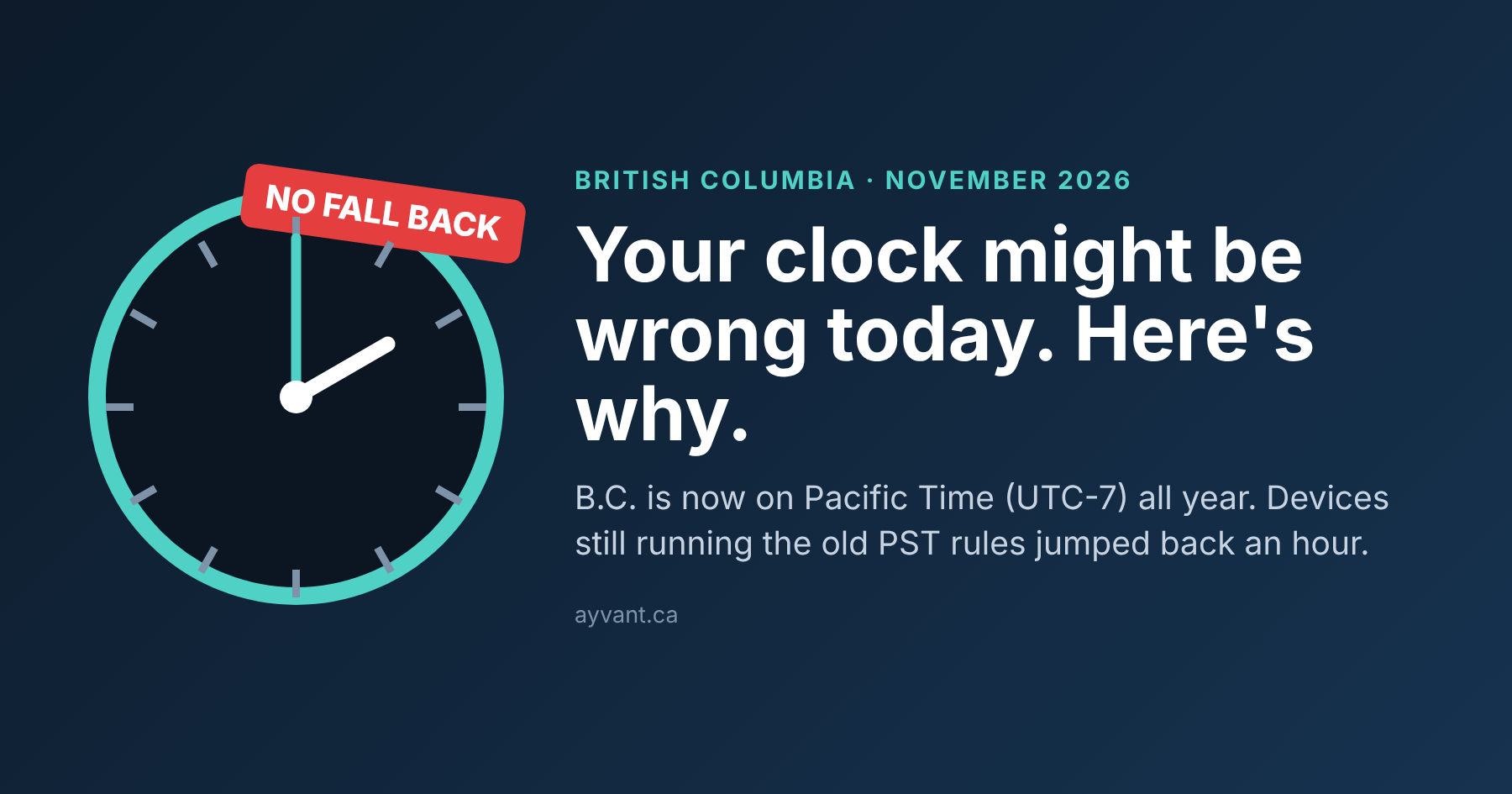
If you woke up this morning and your phone said one thing, your laptop said another, and the microwave was somehow the only one telling the truth, you’re not alone. Our phones at Ayvant started lighting up before 8 a.m.
Here's what happened. B.C. did not fall back last night. The province moved its clocks forward on March 8 for the last time, and as of today it’s officially on Pacific Time (PCT), UTC-7, all year round. The old PST label is gone. But plenty of phones, PCs, and calendar apps still have the old rule baked in, so overnight they quietly rolled themselves back an hour.
The good news: it’s usually a two-minute fix. Below is what’s going on, how to check your own devices, and the exact settings for Windows, Mac, iPhone, and Android.
What actually changed in B.C. on November 1?
The short version: the clocks you set in March are the clocks you keep. The provincial law behind this was passed back in 2019, but it sat on the shelf waiting for Washington, Oregon, and California to move too. That didn’t happen, so B.C. went ahead on its own this year.
- New name: Pacific Time (PCT). PST and PDT are retired in B.C.
- Offset: UTC-7, the same as summertime. No more switching.
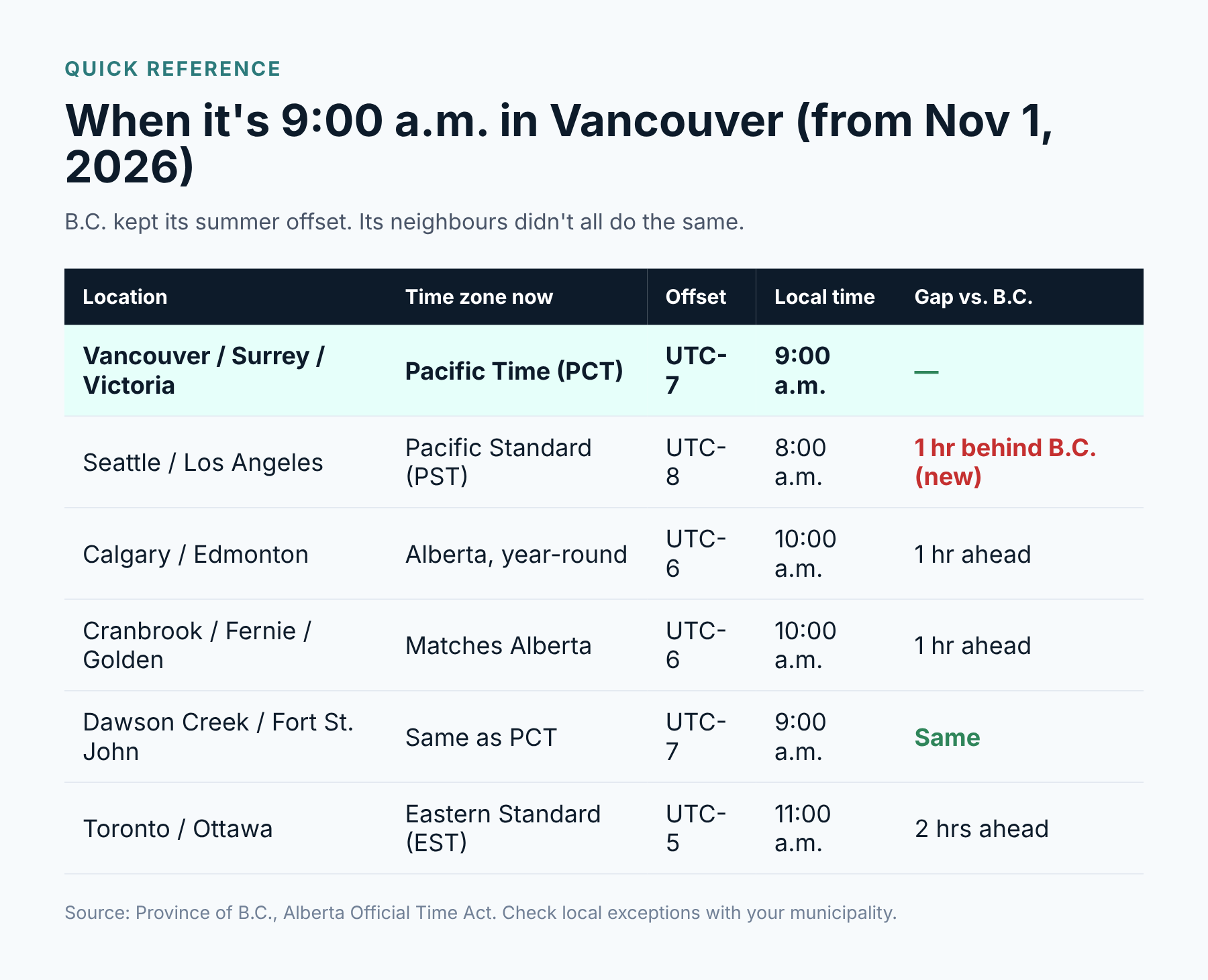
- Alberta did something similar and is now on UTC-6 all year. East Kootenay communities like Cranbrook, Fernie, Golden, and Invermere stay matched with Alberta.
- Northeast B.C. (Dawson Creek, Fort St. John, Fort Nelson, and others) already shows the same time as PCT, so nothing changes there.
The part that trips people up is our neighbors to the south. Washington, Oregon, and California did fall back. So for the first time, Vancouver is now an hour ahead of Seattle through the winter. If you work with U.S.clients or have a team in L.A., that matters.
Why are phones and computers getting it wrong?
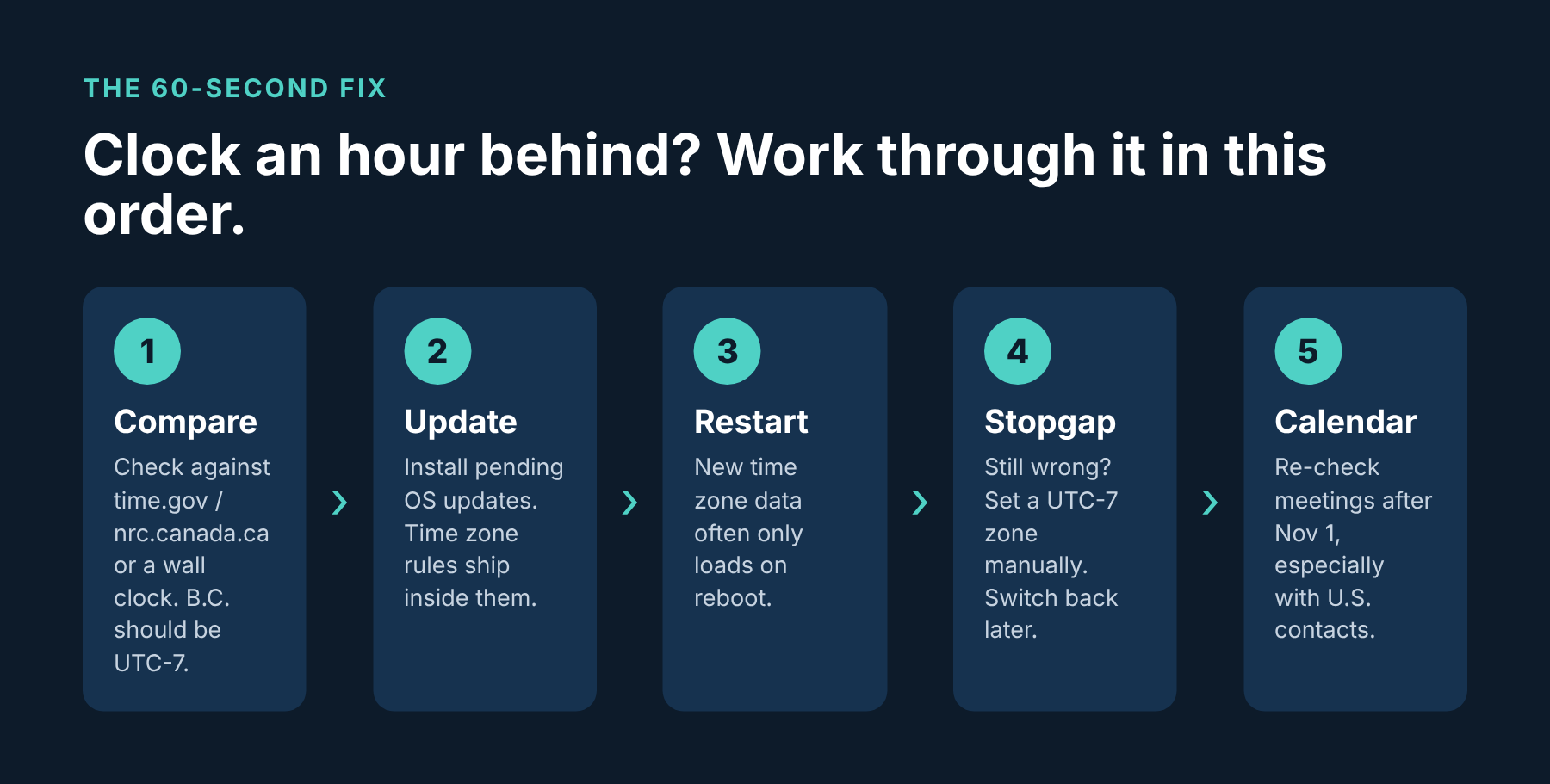
Your devices don't “know” what time it is in B.C. They know what time it is in UTC, and they look up a rulebook (the time zone database) to work out local time. Apple, Microsoft, and Google all pushed updated rulebooks over the last few months. If a device hasn’t installed that update or installed it but hasn’t restarted since, it’s still reading the old page that says, “Vancouver falls back on the first Sunday in November.”
That’s why you'll see one phone right and the one sitting next to it wrong. Same carrier, same Wi-Fi, different update history.
A quick way to check: compare your device against the National Research Council's official time (nrc.canada.ca) or simply a laptop you know is up to date. In B.C. right now, the correct offset is UTC-7.
How to fix the time on Windows 10 and Windows 11
- Open Settings > Windows Update and install everything waiting. Microsoft shipped the B.C. change in its fall 2026 updates (October's Patch Tuesday for most machines).
- Restart. Not “shut the lid." A real restart.
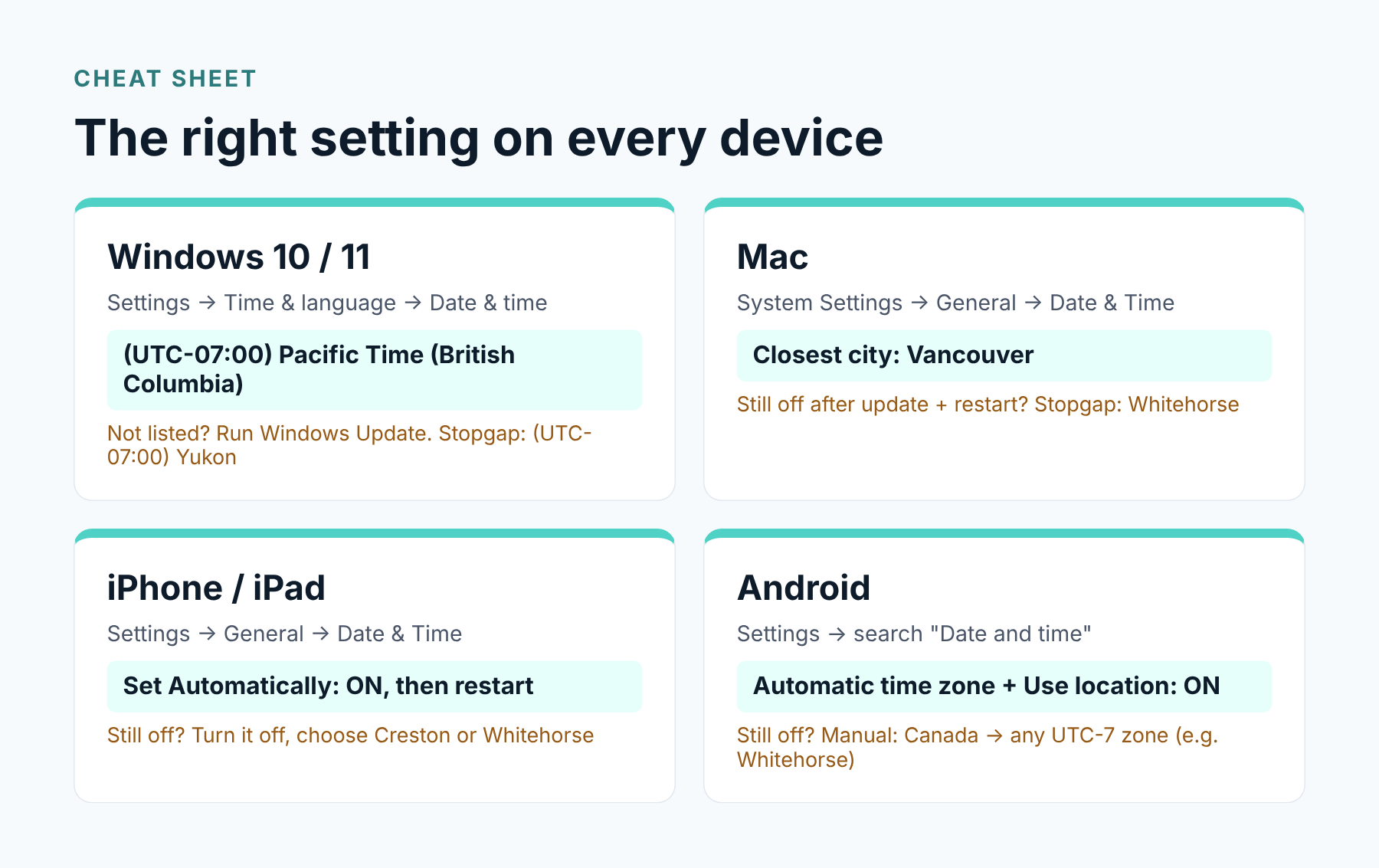
- Go to Settings > Time & Language > Date & Time and make sure the time zone reads UTC-07:00 Pacific Time (British Columbia). Heads up: in the dropdown it may sit above the other UTC-7 entries rather than in number order.
- Leave the set time automatically on, then click Sync now.
Can’t find the British Columbia option? Your PC hasn’t got the update yet. As a stopgap, choose (UTC-07:00) Yukon. Yukon has been on UTC-7 year-round since 2020, so the clock will be right. Switch it back once the update lands. This is also the answer for Windows 10 machines that aren’t on Extended Security Updates, though honestly, that’s a sign it’s time to talk about replacing them.
One warning: don't pick “(UTC-08:00) Pacific Time (US & Canada)." That’s the old rule, and it’s exactly what’s causing the problem.
How to fix the time on a Mac
- Open System Settings > General > Software Update and install any macOS update.
- Restart. Macs often go weeks without a reboot, and then the new time zone data only loads on startup.
- Go to System Settings > General > Date & Time. Keep the set time and date automatically on, and set the closest city to Vancouver.
Still showing an hour behind? Turn off the automatic time zone and pick Whitehorse as the closest city. Same time, different label. Set it back to Vancouver after your next macOS update.
How to fix the time on an iPhone or iPad
- Go to Settings > General > Software Update and install whatever’s there.
- Go to Settings > General > Date & Time and make sure Set Automatically is on.
- If you see a note about updated time zone definitions, restart the phone. That’s the step most people skip.
Some iPhones have started showing Creston, or “Mountain Standard Time," as the city. Looks wrong, but it isn’t: Creston is a B.C. town that’s been on UTC-7 all year for decades, so the clock matches. If yours is still an hour off after a restart, turn off Set Automatically and choose Creston or Whitehorse yourself. Just remember to flip it back on later; otherwise, your phone won’t adjust when you travel.
How to fix the time on Android (Samsung, Pixel and others)
Google flagged this one publicly ahead of the change. Older Android software may move the clock back an hour on November 1 even though it shouldn’t.
- Install all pending updates. On Android, that means two places: the regular system update from your phone maker and the Google Play system update (Settings > Security & privacy > System & updates on most phones; the menu names vary a bit on Samsung).
- Restart the phone.
- Open Settings and search “Date and time." Turn on Automatic Time Zone and Use Location to set time zone.
- Still wrong? Turn the automatic time zone off, choose Canada as the region, and pick a UTC-7 zone such as Whitehorse.
Don’t forget your calendar
This is where the real headaches show up, usually a few days later. A clock that’s an hour off is obvious. A meeting that quietly moved by an hour is not.
- Recurring meetings created before today might shift, especially ones with people in the U.S. or Alberta. Open your next two weeks and eyeball them.
- Outlook on the web and new Outlook: Settings > Calendar > View > Time zones, then set it to (UTC-07:00) Pacific Time (British Columbia).
- Only the organizer should fix a shared meeting. If everyone edits their own copy, things get messy fast.
- Google Calendar is moving most affected events back automatically. Check the web version for a “Move one hour earlier” prompt on anything it couldn’t fix. Invites that came from Outlook aren’t included.
- Booking tools like Calendly, Jane, Clio, or your dental scheduling software each have their own time zone setting. Check them, and double-check any appointment reminders going to clients this week.
For business owners: a quick checklist
If you run an office, a wrong clock is more than an annoyance. It’s missed appointments, payroll punches in the wrong hour, and log timestamps that don’t line up when you need them for an audit or a security investigation. Here’s what we're checking for our own clients this week:
- Every workstation and laptop is patched and has been restarted since October.
- Servers, firewalls, and network gear are pulling time from a reliable source and show UTC-7.
- Time clocks, door access systems, phones (VoIP), and security cameras are showing the right time. These are the ones people forget.
- Line-of-business apps (practice management, accounting, and CRM) have the correct time zone in their own settings.
- Client-facing reminders and booking pages show the right time, especially if you serve U.S. clients.
The bottom line
B.C. is on UTC-7 now, and it’s staying there. If something’s an hour behind, it’s almost always a missing update or a device that hasn’t restarted. Update, restart, check the setting, and you’re done.
If you’ve got a whole office to sort out, or you’d rather not spend Monday morning walking desk to desk, give us a shout. Ayvant’s team in Langley and Surrey can push the fix to every device remotely and make sure nothing slipped through. Book a quick call at ayvant.ca.
Frequently asked questions
Did B.C.fall back on November 1, 2026?
No. B.C. moved its clocks forward on March 8, 2026, for the last time and stayed there. The province is now on Pacific Time (UTC-7) all year.
Why is my phone an hour behind in B.C.?
Your device is still using old time zone rules that tell it Vancouver falls back to PST in November. Installing the latest update and restarting usually fixes it.
What timezone should I choose on Windows in B.C.?
Pick (UTC-07:00) Pacific Time (British Columbia). If it isn’t in the list yet, run Windows Update. As a short-term fix, (UTC-07:00) Yukon shows the same time.
Is B.C. now the same time as Seattle?
No. From November 1, 2026, Vancouver is one hour ahead of Seattle, Portland, and Los Angeles until the U.S. springs forward in March.
Does all of B.C. use the new Pacific Time?
Most of it. Northeastern communities like Dawson Creek and Fort St. John already show the same time. Southeastern areas like Cranbrook, Fernie, and Golden follow Alberta (UTC-6).
Sources: Province of British Columbia (gov.bc.ca); UBC IT; Google Android guidance on Canadian time changes; Microsoft Windows release notes. Information current as of November 1, 2026.